Volunteer, it’s good for your soul!

With busy lives, sometimes it can be hard to find time to volunteer. However the benefits of volunteering can be enormous, besides the good that we are making for someone else or for the environment, expecting nothing in return.

In a ever changing world, in which we are less and less concerned with each other or with those around us, it is important not to lose the true meaning of what “being human” really is.

We are not the most important thing that exist. We must stop being egocentric, raise the head of the cell phone and start observing the world.

We will then realize that sometimes with a small gesture of kindness we can make our day and that of another much better.


The excuse of “it’s only this time” becomes a barbarity these days.

The meaning of life is to give life meaning”

I just feel that my life has a true propose only when I do something for someone or for a cause, that can´t do nothing in return for me. But that is not entirely true! The benefits it gives us are many.

Surprising Benefits of Volunteering

# Learn or Develop a New Skill

Volunteering is a great way to develop a unique skill or discover something you are good at.

# Stay Physically and Mentally Healthy

It has a profound effect on your psychological well-being, reduces stress and anxiety, combats depression and makes you happy. You will feel yourself better in regular contact with others and experience a natural sense of accomplishment. The better you feel about yourself, a more positive view you’ll have on your life and future goal.

# Advance Your Career

Volunteering gives you the opportunity to practice important skills used in the workplace, such as teamwork, communication, problem solving, project planning, task management, and organization. 

# Understand Yourself Better

Volunteering is useful for developing your personality. 

 Your role as a volunteer can also give you a sense of pride and identity. And the better you feel about yourself, the more likely you are to have a positive view of your life and future goals.

# Connection with the World

Volunteering allows you to connect to your community and make it a better place. Even helping out with the smallest tasks can make a real difference to the lives of people, animals, and organizations in need.

# Give Up Bad Habits

It help to struggle with bad habits. Each addiction is developed because a person in some period of his or her life starts feeling incomplete. Volunteering helps people to fulfill their lives with meaning so that they don’t feel incomplete like they used to.

What are you waiting for? Find the right volunteer opportunity and make it your goal for this year!

Learn how to create a dynamic Rainbow with HTML5 Canvas

First of all, what is canvas?

The HTML <canvas> element is used to draw graphics, on the fly, via JavaScript.

The <canvas> element is only a container for graphics. You must use JavaScript to actually draw the graphics.

A canvas is a rectangular area on an HTML page. We have always to specify an id attribute (to be referred to in a script), and a width and height attribute to define the size of the canvas.

And now, the fun part

Step 1 – Grab the Canvas Element

Create your new HTML file.

Then, we have to find the <canvas> element and grab it. We will do that by using the HTML DOM method querySelector() but you can also use the method getElementById().

Step 2 – Create a Drawning Object

Now, what we need is something called a context. You don’t draw directly on the canvas element in HTML, but you draw on something on something called the context.

The context can either be 2D, which is what we’ll be working with, but you can also use it with 3D for the stuff like video games.

So we’re going to grab the context by using the getContext() and creating a new variable ctx:

Step 3 – It’s Picasso Time

Now we have to size our canvas to be the exact width of the window, by default is going to be 800px x 800px as in canvas in html, however we want to resize it before we do any of our drawings.

Next, we need to define our canvas background color and our line.

  • lineJoin determines the shape used to join two line segments where they meet
  • lineCap sets the style of the end caps for a line
  • lineWidth property sets the current line width
  • strokeStyle sets the color, gradient, or pattern used for strokes

Now you are going to define a flag, to determine if our mouse is down or up. We are setting the flag to false at the begging and only set to true when the mouse is down.

To start drawing a line, you need a starting X and Y and an ending X and Y.

Now we need a draw function. This function is going to take in an event that is going to be called whenever we move our mouse on top of the canvas. We can console.log() the event and see on our inspect element.

To listen for our mouse move event on the canvas we are going to have a event listener.

But, we don’t want for our function to run all the time, we want to only do it when the person has clicked down. So what we are going to do is verify if the person is not drawing, using our flag.

And how do we change that isDrawing? We are going to have another event listeners.

Now, let’s work in actually start doing the drawing.

First we want to have a starting path and move to our lasts x and y where the mouse stops.

When the draw functions runs, we want to update the lastX and lastY variables, for that we equal lastX = e.offsetX and lastY=e.offsetY.

💡 The e.offsetX and e.offsetY values are coming from the event MouseEvent.

We now also need to update the mousedown EventListener function and add the event, because we want that as soon as the person clicks their mouse down to start, before we do a mouse move (because mousedown will happen before we move our mouse) then we´re going to update the lastX and lastY, and that is going to put us where we want to go rather than starting at (0,0).

Great! Now you must be seeing something like this

It’s white because we defined the strokeStyle as white in the begging.

To add some color, we need to set a new variable hue and add the hsl() color value inside our draw function in order to change the color. HSL color values are specified with: hsl(huesaturationlightness)

  • Hue is a degree on the color wheel from 0 to 360. 0 is red, 120 is green, 240 is blue.
  • Saturation is a percentage value; 0% means a shade of gray and 100% is the full color.
  • Lightness is also a percentage; 0% is black, 100% is white.

We need to increment our hue value in order to have our rainbow look and we need also to reset our hue value to not be bigger then 360.

So, probability right now what we have is something like this:

Another thing that we can do, is also change the lineWidth to grow bigger until a certain point and then decrease. We can even conjugate that with the direction, and when the direction changes, the line width also change.

So we need to create a new variable for the direction:

And finally we add new logic inside our draw function:

And tada! You are now a HTML5 Canvas Picasso! 🤪

To see the full code and a example, you can check my codepen.

Or you can check the JavaScript 30 course from Wes Bos, from where I get this great tutorial!

How to add an existing project to GitHub – using the command line

1. First you have to create a new repository on Github. Don’t need to add files already. You can do it after.

⚠️ You cannot create a repo on github using git bash. Git and Github are different things. Github is a platform that let’s you host and collaborate on code while git is the version control tool used.

2. Open Git Bash.

3. Change the current working directory to your local project.

4. Initialize the local directory as a Git repository.

$ git init

For example, in my case my local project is in the test folder, so I used the cd command to open that folder and then the git init command.

This creates a new folder in your test folder.

5. Add the files in your new local repository. This stages them for the first commit.

$ git add .

Adds the files in the local repository and stages them for commit. To unstage a file, use ‘git reset HEAD YOUR-FILE’.

💡 git add . adds / stages all of the files in the current directory.

6. Commit the files that you’ve staged in your local repository.

$ git commit -m “First commit”

Commits the tracked changes and prepares them to be pushed to a remote repository. To remove this commit and modify the file, use ‘git reset –soft HEAD~1’ and commit and add the file again.

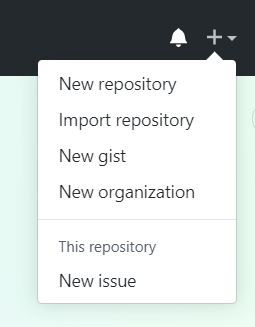
7. At the top of your GitHub repository’s Quick Setup page, click  to copy the remote repository URL.

8 . Add the URL for the remote repository where your local repository will be pushed.

$ git remote add origin remote repository URL

# Sets the new remote

$ git remote -v

# Verifies the new remote URL

9. Push the changes in your local repository to GitHub.

$ git push origin master

Pushes the changes in your local repository up to the remote repository you specified as the origin

Et voilà! You have now your local project in Github! 😊

Primitive vs Reference Types

I started taking the course Accelerated JavaScript Training by Maximilian in Udemy and I found very interesting the why he explained the difference between those types in JavaScript, so I decided to write about that.

In JavaScript variables can have different types, but those types can be categorize into categories: Primitive and Reference.

Primitives

Primitive are simple types like Boolean, String and Number.

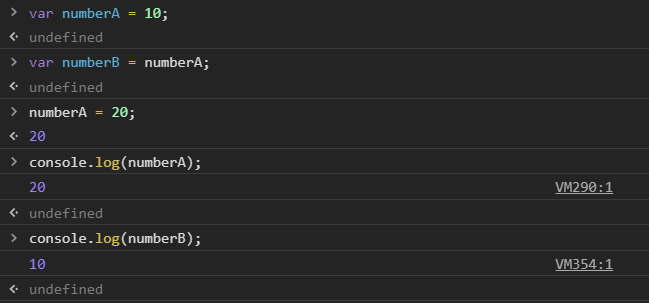
When you copy a primitive, then the new variable will actually be a copy of that one. This means that if you change the first variable, the second variable (the copy one) will not be changed.

You can do this example in your browser console.

Reference Types

Reference Types are more complex ones like Object or Array.

When it comes to Reference Types, what we have is not a copy of the variable. In this case the variable doesn’t actually store the data but it only stores a pointer to a place in memory, where data is stored.

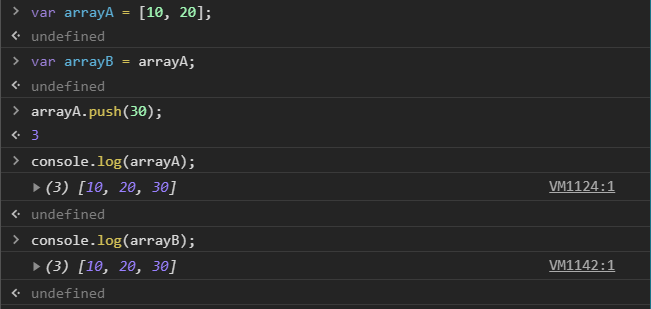
Therefore, if you copy a reference type variable, you copy the pointer. If you change the value of the first variable, the value of the second one will also be changed since you changed the data in the memory. The pointer is still the same.

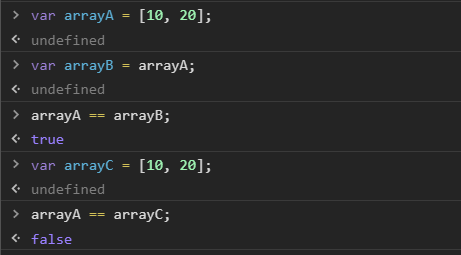
So if we try to check if ArrayA is equal to arrayB, we it will be true, but in a case that we create a new array ArrayC with exactly the same values as ArrayA and we check for equality, we will get false.

Because in ArrayC case, we also create a value, an array and we store this in memory too. It’s not the same storage place as arrayA, since a new array was created. We know that is exactly the same, but JavaScript doesn’t. And that is a good thing because we can add a new value to this array and all of a sudden it wouldn´t be the same anymore.

When we are comparing the objects, we are actually comparing the pointers, and the pointers, point to different locations in memory.

The Coding Mermaid – From marine biology to code development

I wanted to write about my story but I didn’t know exactly how to start, or even what name to give it. Meantime, while talking with someone that I met when I was younger, during the phase when I was studying biology, and who after all these years, I now work with in a web developer company. I asked for help and he gave me this idea for a title which I immediately fell in love with. Thanks for that! Now I have somewhere to start from.

A year ago exactly, at the age of 30, I started my story within web development. But first things first. I graduated in marine biology some years ago. I have a boat driver license’s, I’m a scuba diver and I love all the sea related aspects. But life doesn’t always go the way we expect and sometimes we have setbacks.

I had a really serious car accident that made me unable to walk for a long time. I spent 2 months in a hospital bed and another one at home. When I finally started doing physical therapy to be able to walk again, it wasn’t a process that made me feel healed right away. For years I had a lot of pain; I was unable to do certain movements or walk for too long. I felt that I was incapable of doing things for myself or to even try to go after a job related to my field, at least in the outdoors, which was what I really would have liked to do.

source: giphy.com

I even tried to take another course, an accounting course, but I just hated that. I also started a project myself, with cacti and succulents. I created a brand and had a lot of work for some time, and although it wasn’t enough to pay my bills, it was really great to show to myself that I was able to be creative and start new things.


Then, 2 years ago, I started to think about what else I also loved, and I always love the small changes that I made on blogger or tumblr, inserting scripts etc. So, I researched courses related to something like that and after a lot of investigation and conversations with people in this area, I finally decided to go attend a Web Design course.

The course was very complete. It covered how to conduct a good briefing, how to organize ideas, ux and ui, web design tools and concepts, delivery of a full website design and its prototype, and digital marketing. The last part was to build our own website based on our prototype, using html, css, Jquery, JavaScript, PHP and SQL.

The course ran from October 2017 until July 2018. I was working part-time in a store and half of my wages went towards paying for the course every month.

So after I finished the course I kept on studying, focusing on the Frontend development part. I even reduced my working hours, because I was very committed to studying and I said to myself that I was going to change career that year. My only focus started to be that main goal. No distractions, “but this” or “but that”.


When I had my first job offer it felt almost unreal. I only believed it when I was seated at my desk. At the same time, I felt like I deserved to be where I was and that all the hard work paid off, but at the same time I felt so scared.

Some time later, I went to a party where I made some connections and met a great friend that has always believed in me since then, and he invited me to another party where I met the company owners of my future job, where I’m working now, and that was really a dream come true because I immediately felt in love with the office and the company.

A rare sight of myself

I’m now 31 years old and I’m happy that I made the decision not to resign myself to giving up, but to search for new challenges and to make goals and accomplish them.

There will always be hard moments in our path, things are not easy, and there are times when we feel that we want to quit, or that we are not capable. Those days are just that. Days. We shouldn´t build our lives around those. But, rather, create the opportunity to have better days. Focus on your goals and never quit.

I’m not comfortable in my work, coming from a different field makes me feel that I always must work harder or learn more. But the secret is to never let our fears overcome our dreams. Look around, exchange ideas with your friends and colleagues, they can help you a lot in tough moments.


Take time for yourself. It’s never to late to believe in yourself. Do you have a dream? Go for it! I hope that my story inspires you to also go after what you want.


Array.splice() vs Array.slice()

The splice() method

  • returns the removed item(s) in an array
  • changes the original array
  • can take n number of arguments:

Argument 1: Index, Required. An integer that specifies at what position to add /remove items, Use negative values to specify the position from the end of the array.

Argument 2: Optional. The number of items to be removed. If set to 0(zero), no items will be removed. And if not passed, all item(s) from provided index will be removed.

Argument 3…n: Optional. The new item(s) to be added to the array.

Syntax

array.splice(index, howmany, item1, ….., itemX)

The slice() method

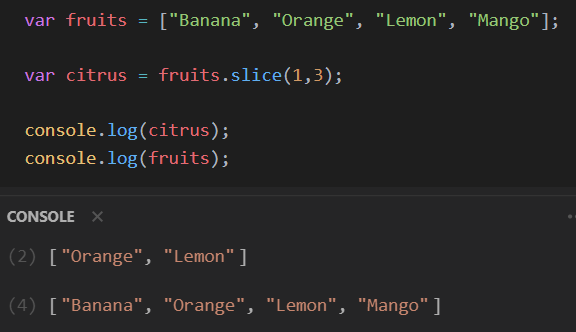
  • returns the selected element(s) in an array, as a new array object
  • doesn’t change the original array
  • can take 2 arguments:

Argument 1: Required. An integer that specifies where to start the selection (The first element has an index of 0). Use negative numbers to select from the end of an array.

Argument 2: Optional. An integer that specifies where to end the selection. If omitted, all elements from the start position and to the end of the array will be selected. Use negative numbers to select from the end of an array.

Syntax

array.slice(start, end)

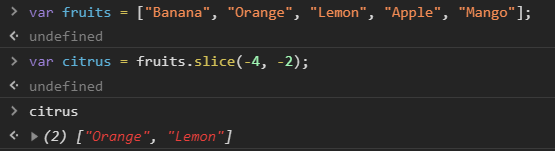
Example with slice using a negative number to select from the end of an array (in this case we don’t start the counting from 0 as we do with positive numbers)

Command Prompt Commands

Before I was a developer, always found very cool the command prompt console. So when I started to learn code, I also investigated about this. And was very handy sometimes and I felt like a hacker. 😎 So here it goes!

Change directory

Is a command used to change the current working directory

cd <name of the folder that you want to open>

Create a new directory

Is a command that allows you to create a new folder

mkdir <name of the new directory>

Create a new directory and open it

Is a command used to create a new directory and open it right after created

mkdir <name of the new directory> && cd <name of the new directory>

Move up to one directory

Is a command used to move you up one directory

cd ..

Check files inside a folder

Is a command used to show all the files that you have inside a directory

dir

Clear

Clear all console

cls

Open your project in visual studio code

Opens a new window of visual studio code with your selected project

code .

Comfort Zone

A comfort zone is a psychological state in which things feel familiar to a person and they are at ease and in control of their environment, experiencing low levels of anxiety and stress. 

Since I started my journey at my dream job, 6 months ago, this is the second time that I have been asked to change project.

I started in a big team, where the project was already built, had reusable components, reusable lines of code, everything was super organized and had a senior front-end developer as my tutor. Things were quite easy besides the difficulty of learning how a CI works.

After 2 months I was asked to move to a different project to do the redesign, were I was going to be the only front end developer. I was so nervous about it but I embraced the challenge even so.

It was great for developing my soft skills since I had to have a lot of meetings with the client in order to discuss the website layout, ideas, work on feedback. I even went to the clients office to get to know everyone personally. I also had to do several design stories and that was awesome to be able to introduce new features to the website coming from my creativity.

In the last week I went to another phase in which was required that I do more work than excepted and built pages in a language that I wasn’t comfortable at all. That was at the same time pretty scary, frustrating because I didn’t want to prejudice all the sprint with my time learning how to built and with “IT DOESN’T WORK? WHY??”, but at the same time woke up in me the huge necessity that I have to learn more stuff and be better at my work.

Then, after 4 months in this second project I was asked to move to another different project. And when I say different it is really different. In this third project they use a different markup because things are build in an e-commerce platform.

I had some time to think but in my head my answer was already decided. I was going to embrace this new challenge, even that is again out of my comfort zone and more, in this phase that I’m a junior and have so much to learn. I also had a development plan in the beginning, when I started, that until today is only partiality completed.

So Monday, I will have to change places, teams, project and even floor. I hear a lot of people talking about comfort zone and I feel that for me, this year, I’m always in an uncomfortable zone, but that isn’t necessarily a bad thing. 🦊

What is a SVG?

The definition of SVG by w3schools is:

  • SVG stands for Scalable Vector Graphics
  • SVG is used to define vector-based graphics for the Web
  • SVG defines the graphics in XML format
  • Every element and every attribute in SVG files can be animated
  • SVG is a W3C (World Wide Web Consortium) recommendation
  • SVG integrates with other W3C standards such as the DOM and XSL

So what are the advantages of using a SVG?

  • SVG images can be created and edited with any text editor
  • SVG images can be searched, indexed, scripted, and compressed
  • SVG images are scalable
  • SVG images can be printed with high quality at any resolution
  • SVG images are zoomable
  • SVG graphics do NOT lose any quality if they are zoomed or resized
  • SVG is an open standard
  • SVG files are pure XML

SVG images can be created with any text editor, but it is often more convenient to create SVG images with a drawing program and they can have different shapes!

<svg height="180" width="500">
  <ellipse cx="200" cy="80" rx="100" ry="50" style="fill:#000000;stroke:#00ffff;stroke-width:2" />
</svg>

An ellipse, a circle, a rectangle, a line, a polygon with three sides, a star, a path, etc.

The cooler effects that I recently discovered was that a svg can define the color of a line, text or outline (stroke), define the width of a line, text or outline (stroke-width), define different types of endings to an open path (stroke-linecap) or define dashed lines (stroke-dasharray).

In the first image, I’m using a rectangle svg shape with a stroke-dasharray effect.

And then I added the styles, check my codepen.

What the heck is Human Centered Design

IDEO defines human centered design as a creative approach to problem-solving that starts with people and ends with innovative solutions that are tailor-made to suit their needs.

It’s vital to identify the real goal of real people who will use your product.

But what distinguishes human-centered design from other problem solving approaches?

The main focus on understanding the perspective of the person who experiences a problem, their needs, and whether the solution that has been designed for them is truly meeting their needs effectively or not.

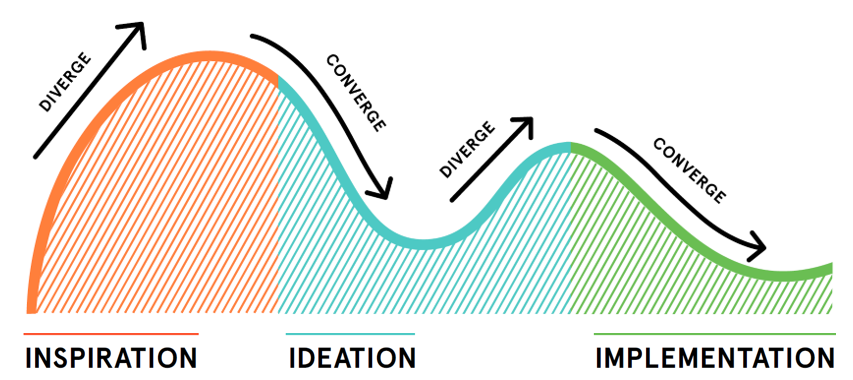
Human Centered Design Phases

Inspiration

In this phase, you’ll learn how to better understand people. You’ll observe their lives, hear their hopes and desires, and get smart on your challenge.

Ideation

Here you’ll make sense of everything that you’ve heard, generate tons of ideas, identify opportunities for design, and test and refine your solutions.

Implementation

Now is your chance to bring your solution to life. You’ll figure how to get your idea to market and how to maximize its impact in the world.

So, now we can ask, what is the difference between human centered design and user experience design?

Human Centered Design is a framework that considers human perspectives throughout the design process.

User experience design is the design of multisensory experiences, typically at the interface between humans and technology. It is one of many design disciplines that takes a human-centered approach.